
If you have ever watched a TV channel that runs 24 hours a day with bumpers between shows, a clock in the corner, and ads slotted in at precise moments, that is a playout system doing its job.
Components of a Playout System
A playout system is not a single piece of software. It is a stack of components that need to work together reliably, often for months without interruption.
Media Asset Management (MAM)
The MAM is where all your content lives: video files, metadata, thumbnails, rights information, and technical specifications. A good MAM lets operators search, preview, and organize content without touching the file system directly. In practice, the MAM is also where you catch problems before they reach air: missing audio tracks, wrong aspect ratios, or files that have not finished transcoding.
For large operations, the MAM connects to ingest stations, transcoding pipelines, and archive systems. For smaller setups like a single FAST channel or a community stream, the MAM might be as simple as a folder of MP4 files with a spreadsheet of metadata.
Video Server
The video server stores media and plays it out frame-accurately on schedule. In traditional broadcast, this meant dedicated hardware (think Harmonic, Grass Valley, or Imagine Communications racks). In IP and cloud workflows, the video server is often software decoding files and pushing output to an HLS or DASH packager.
What matters most in a video server is reliability. A buffer underrun or a failed file read means dead air, which is the single worst thing that can happen in broadcast. This is why professional playout servers use redundant storage, pre-roll buffers, and failover mechanisms that kick in within frames, not seconds.
Broadcast Automation
Automation is the brain. It reads the schedule (often called a playlist or rundown), tells the video server what to play and when, triggers graphics, fires SCTE-35 ad markers, and handles transitions. Good automation handles the routine (overnight scheduling, back-to-back episodes, commercial breaks) so that operators only intervene for live events or last-minute changes.
The level of automation varies widely. A fully automated FAST channel might run unattended for weeks. A live news channel might have an operator adjusting the rundown every few minutes. The playout system needs to support both extremes.
Channel Branding and Graphics
Channel branding covers everything the viewer sees that is not the content itself: the channel logo (bug), lower thirds, coming-up-next overlays, clocks, and squeeze-backs. In traditional broadcast, this was handled by dedicated character generators (CG) like Vizrt or Chyron. In software-based playout, graphics rendering is often built in.
Branding matters more than most engineers think. A channel without consistent branding looks amateur. A channel with well-executed branding (smooth transitions, legible text, a recognizable logo position) builds trust and keeps viewers from channel-surfing.
Monitoring and Quality Control
Before content reaches air, it should pass through QC checks: correct audio levels (loudness compliance per EBU R128 or ATSC A/85), proper video levels, no black frames, no frozen frames, and matching aspect ratios. Playout systems typically include confidence monitoring, a real-time preview of exactly what is being sent to the output.
In IP delivery, monitoring extends to stream health: segment availability, manifest consistency, keyframe alignment, and CDN propagation. A playout system that outputs a perfect file but feeds it to a broken packaging pipeline is still a broken channel.
Types of Playout: Traditional, Cloud, and Software-Based
Traditional Hardware Playout
Until about 2015, playout meant dedicated hardware in a machine room. Companies like Harmonic (Spectrum), Imagine Communications (Versio), Grass Valley (iTX), and Pebble Beach (Marina) dominated the market. These systems cost hundreds of thousands of dollars, required specialized engineers to operate, and were designed for the kind of reliability where "five nines" uptime was the baseline expectation.
Traditional playout is still alive in large broadcast operations (national TV networks, major sports broadcasters) where the cost of a single minute of dead air exceeds the annual license fee of the software. But the market is shifting.
Cloud Playout
Cloud playout moved the automation, file storage, and stream generation to managed infrastructure, typically AWS, Azure, or GCP. Products like AWS MediaLive Channel Assembly, Amagi, Wurl, and Frequency handle playout as a service. You upload content, build a schedule, and the platform outputs a stream.
The appeal is obvious: no hardware, no maintenance, pay-per-channel pricing. The tradeoff is control. Cloud playout works well for 24/7 linear channels with relatively simple schedules. It works less well when you need frame-accurate control, custom graphics rendering, or workflows that do not fit the platform's assumptions.
There is also cost. Cloud playout pricing looks attractive for one or two channels. At ten or twenty channels running continuously, the monthly bill often exceeds what a self-hosted solution would cost, and you still do not own the infrastructure.
Software Playout on Commodity Hardware
The middle ground, and where most of the interesting work is happening, is software playout running on standard hardware. Tools like CasparCG (open source), StudioTV (by iReplay.TV), or FFmpeg-based pipelines let you build playout systems that run on regular servers or even desktop machines.
This is the approach we use at iReplay.TV. Our FAST channels and VOD2Live streams run on software playout stacks that automate scheduling, handle transitions, and output HLS directly. The cost per channel is a fraction of traditional solutions, and we have full control over the workflow.
My TV Channel, our macOS app, takes this further by putting a complete playout system on a Mac. You load your video library, set up a schedule or let the automation handle rotation, and the app outputs a live channel, complete with branding overlays. It is designed for content creators, local broadcasters, and anyone who wants to run a 24/7 channel without renting cloud infrastructure or buying broadcast hardware.
Playout in Live Streaming
In live streaming, the playout system sits between the content source and the delivery network. For a live event, this means taking an incoming feed (via SDI, NDI, SRT, or RTMP), applying graphics and branding, and encoding the output for distribution.
The key difference from file-based playout is latency sensitivity. In a file-based workflow, the playout system can buffer ahead and pre-render transitions. In a live workflow, everything happens in near-real-time. A graphics overlay triggered by a producer needs to appear on screen within a frame or two, not after a two-second processing delay.
Live playout also needs to handle the unexpected: feeds dropping, schedule overruns, breaking news interruptions. The automation must support manual override without losing track of the overall schedule.
For adaptive bitrate delivery, the playout system (or the encoder downstream) produces multiple renditions (typically 540p, 720p, and 1080p) so viewers on different connections get the best quality their bandwidth supports. This is standard practice for HLS and DASH delivery.
Playout in Video on Demand (VOD) and VOD2Live
For pure VOD, there is no playout in the traditional sense. Files are transcoded, packaged, and served on request. But the line between VOD and linear has blurred significantly with the rise of VOD2Live.
VOD2Live (also called virtual linear or pseudo-live) takes existing VOD assets and plays them out as a continuous linear stream, mimicking a traditional TV channel. The playout system schedules content from the library, adds transitions, inserts ad breaks with SCTE-35 markers for server-side ad insertion (SSAI), and generates an HLS manifest that looks exactly like a live stream to the player.
This is the backbone of most FAST channels today. The content is pre-recorded, but the viewer experience is lean-back linear TV. The playout system makes the difference between a channel that feels curated and professional versus one that feels like a random shuffle.
Playout for FAST Channels
Free Ad-Supported Streaming Television has been the biggest growth area for playout systems since 2022. Platforms like Samsung TV Plus, Pluto TV, Tubi, and Amazon Freevee aggregate hundreds of FAST channels, each needing its own playout.
FAST playout has specific requirements that differ from traditional broadcast:
Dynamic Ad Insertion
FAST channels are monetized through ads, and the ad experience needs to be seamless. The playout system must insert SCTE-35 markers at the right moments, and the downstream ad insertion system fills those slots with targeted ads. Poorly timed markers mean missed revenue or broken viewing experiences.
Scale Without Proportional Cost
A broadcaster running five channels can afford dedicated playout infrastructure per channel. An operator running fifty or a hundred FAST channels cannot. This is where cloud playout and lightweight software solutions become essential, because the economics only work if the per-channel cost stays low.
Content Rotation and Scheduling
Most FAST channels have limited content libraries, often a few hundred hours at most. The playout system needs intelligent rotation to avoid showing the same content too frequently while maintaining thematic coherence. Simple random shuffle is not enough; viewers notice and leave.
We have built this kind of scheduling automation for several VOD2Live channels, including weighted random scheduling that factors in recency, category, and time-of-day preferences.
Choosing a Playout Solution
There is no single best playout system. The right choice depends on your scale, budget, technical team, and what you are actually trying to do.
For a single channel or small operation
Software playout on commodity hardware, or an app like My TV Channel on macOS, is usually the right starting point. The capital cost is minimal, the learning curve is manageable, and you can be on air in hours rather than months. This is also the approach to consider for community channels, campus TV, local news, or niche content verticals.
For mid-scale operations (5-20 channels)
A combination of software playout and cloud services typically makes sense. Use software playout for channels where you need control (custom graphics, live events, complex scheduling) and cloud playout for simpler, schedule-driven channels. This avoids the cost trap of running everything in the cloud while keeping operational complexity manageable.
For large-scale broadcast
Traditional vendors (Imagine Communications, Harmonic, Pebble) still make sense when uptime requirements are absolute, regulatory compliance is mandatory, and the budget supports it. But even at this scale, the trend is toward software-defined playout running on commodity servers rather than proprietary hardware.
What to evaluate
- Output formats: Does it produce the stream format you need? HLS, DASH, SDI, NDI? At what resolutions and bitrates?
- Scheduling flexibility: Can it handle your workflow: automated rotation, manual overrides, live event insertion, back-to-back content without gaps?
- Graphics capabilities: Built-in branding, or do you need a separate CG? Can it render in real-time?
- Ad insertion: Does it support SCTE-35 markers? Can it integrate with your SSAI provider?
- Failover: What happens when a file is missing or corrupted? Does it skip gracefully or show black?
- Cost at scale: Per-channel monthly cost at your target channel count, including storage, compute, and egress
- Monitoring: Can you see what is on air right now, remotely, without logging into a server?
The Real Cost of Playout
The purchase price or subscription fee of a playout system is rarely the biggest cost. The real expenses are:
Content preparation. Every file needs to be ingested, QC'd, normalized (audio levels, resolution, codec), and metadata-tagged before it can be scheduled. For a 500-hour library, this is weeks of work.
Schedule management. Someone needs to build and maintain schedules. Even with automation, editorial decisions (what airs when, what gets promoted, how holidays and special events are handled) still require human judgment.
Ongoing operations. Monitoring, troubleshooting, updating graphics packages, adding new content, and responding to platform requirements (a FAST aggregator changes their spec, a CDN has an outage, a rights window expires). A playout system that runs itself is a myth. One that minimizes the daily operational burden is the goal.
Delivery infrastructure. The playout system produces the stream, but you still need to get it to viewers. That means encoding, packaging, CDN distribution, and player integration. If you are looking to optimize that part of the stack, we have built a CDN cost optimizer specifically for streaming workflows.
Real-World Example: Cars and Roads Brands TV
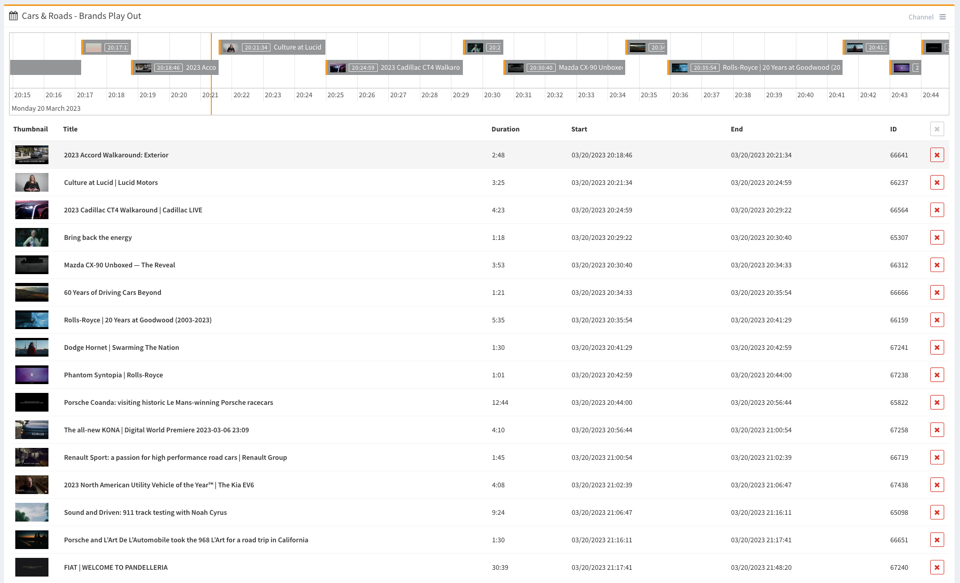
Below is a live view of our playout system for the Cars and Roads Brands TV channel. This is a touch-optimized horizontal schedule view. You can pinch or scroll to zoom, and click to navigate. The channel runs 24/7 with automated scheduling, weighted content rotation, and branded transitions.
This playout runs entirely on software, with no broadcast hardware and no cloud playout subscription. The schedule is generated automatically based on content weights, category rules, and time-of-day preferences. Graphics and branding are rendered inline. The output is an HLS stream served through our CDN infrastructure.
It is not the most complex playout system ever built, but it works, it has been running reliably for months, and it costs almost nothing to operate. For many use cases (FAST channels, community TV, niche content verticals, monetized streaming) that is exactly what you need.