For years, vertical video was the thing your phone recorded by accident and every editor told you to rotate. That framing is now out of date. Vertical has become a format that people choose, that they pay for, and that the largest media companies are building for on purpose. Netflix, Disney and Paramount have all shipped vertical feeds, and Peacock has ordered vertical reality shows. The question for anyone with a video library has shifted from whether vertical matters to how you get a channel of your own onto that screen.
This article explains what vertical TV actually is, why the industry has stopped treating it as a novelty, and how you can broadcast your own vertical channel today, without a studio.
What "vertical TV" actually means
Vertical TV is not the same thing as the vertical video you already know. It is not a vlog, and it is not user-generated content shot on a phone. It is television programming, scripted or unscripted, presented full-screen in a 9:16 frame and watched the way people actually hold their device. Think of a channel you can lean back with on a commute, in a waiting room or in bed, except it lives in your hand instead of on the wall.
The clearest way to see the distinction is against micro drama, the Chinese-born format of ninety-second cliffhanger episodes that proved people will pay to watch a full story on a vertical screen. Micro drama opened the door. What comes next is the rest of television walking through it: true crime, dating reality, documentary, soap, sport, movies, each rebuilt for the vertical frame rather than cropped as an afterthought.
The industry is treating vertical as television, not a gimmick
The best snapshot of where this is heading is a recent episode of the Media Odyssey podcast, where hosts including media analyst Evan Shapiro sit down with the founders of Roseberry, a studio built specifically to make premium television for the vertical screen. It is worth watching in full.
A few points from that conversation are worth pulling out, because they explain why this is a real shift and not a passing trend.
The first is that the audience has already moved. As one of the founders put it, you do not need a research firm to see it, just look around a train carriage: people who used to read a book or turn the phone sideways for a video now hold it upright and watch that way by default. Attention has moved onto the vertical screen, and a large amount of that time is spent in moments that traditional TV never served, on a commute, waiting in a line, or, as the hosts kept returning to, on the toilet. For younger viewers that last one ranks third among favourite places to watch, right behind bed and the living room.
The second is that there is a gap between that demand and the supply of good content. The vertical screen today offers either raw user-generated video at one end or micro drama at the other, and very little premium, story-driven television in between. Shapiro describes the shift as the "cableization" of vertical, a new format filling up the way cable channels once did, with a large amount of white space still open for quality programming.
The third is the mechanic that makes it a business. Roseberry takes long-form horizontal libraries, an eighteen-year-old episode of the Australian soap Neighbours in one example they show, and rebuilds each episode for vertical: reframing the shot, trimming to the storyline that carries the plot, adding on-screen graphics for viewers who are half-watching, and replacing the music. Because it runs on a first-party app, they see exactly which episodes hold attention and can re-edit the ones that do not, something linear television could never do. The results they quote are striking: paywall conversion over fifty percent on top shows, and subscribers spending more than an hour per session.
Why this is an opening, not just a headline
The reason this matters to a creator or a small broadcaster is the same reason it matters to a studio. Premium vertical is a format where the demand is proven but the shelves are mostly empty. Netflix and Disney have the catalogues but very little of their viewing happens on mobile today, and retrofitting a TV-first product for the phone is slow. That gap is exactly where a focused, well-programmed channel can win attention, in the same window where those platforms are losing time to short-form apps.
You do not need a studio, a syndication deal or a twelve-step AI pipeline to take part. You need a library of vertical-friendly video and a way to run it as a channel. That second part is the piece most people are missing, and it is the piece that used to require a playout system and an engineering team.
You can broadcast a vertical channel today
This is where My TV Channel comes in. It turns a collection of videos into a 24/7 linear channel: you upload your content, it transcodes and builds the round-the-clock schedule, and it gives you a player your audience can watch and that you can embed. The channel runs continuously, like a real TV station, rather than sitting as a list of clips.
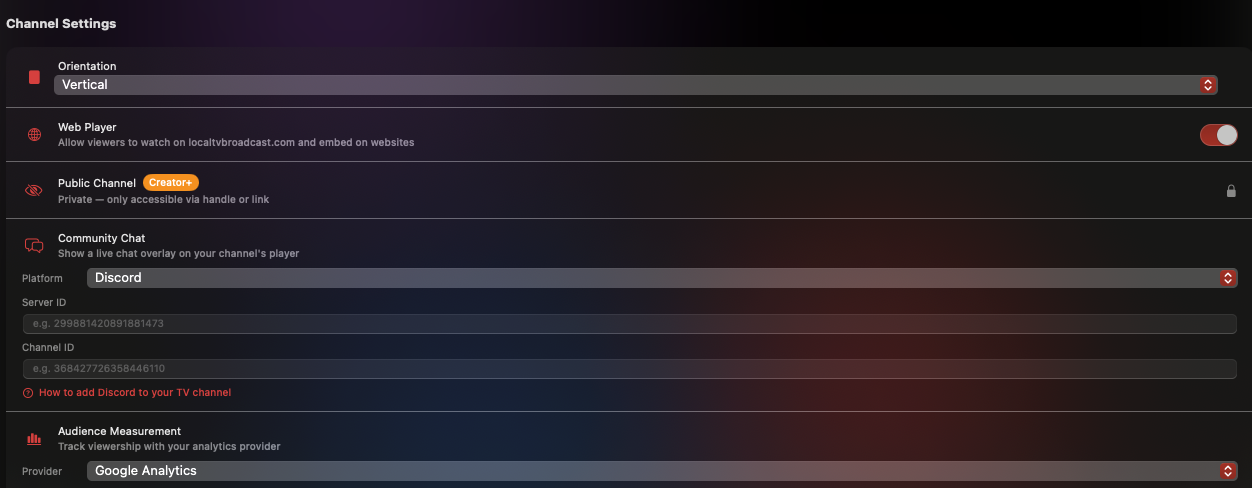
Making that channel vertical is a single setting. In the channel's settings there is an Orientation control, and switching it to Vertical is what tells the channel to play in a full 9:16 frame, the same aspect ratio the whole premium-vertical wave is built around. From that one switch, your channel behaves like the vertical TV the podcast is describing, programmed and always on, not a feed of loose videos.
From the same panel you can turn on the web player so viewers watch on the web and you embed the channel on any site, make the channel public or keep it private behind a handle, add a live community chat overlay, and connect your own analytics to measure the audience. It is the channel-side toolkit the studios in the podcast built for themselves, available to anyone.
How to start a vertical TV channel
- Get the app. My TV Channel runs on iPhone, iPad, Apple TV, Mac and Android, and there is a free tier to start with.
- Create a channel and set the orientation to Vertical. This is the switch shown above. It makes the channel play in 9:16 instead of the default landscape.
- Add your videos. Upload vertical clips, or vertical-reframed cuts of existing content. The app transcodes them and builds a continuous 24/7 schedule automatically.
- Turn on the web player and go public. Enable the web player to let people watch on the web and embed the channel, and set the channel public so it is reachable by its handle and link.
- Share and measure. Post the link, embed the player, connect your analytics, and see what holds attention so you can adjust the programming.
Who a vertical channel is for
Creators with a back catalogue of vertical content can turn it into an always-on destination instead of a feed that scrolls away. Broadcasters and rights holders sitting on horizontal libraries can open a new, mobile-native window for content that has already earned its keep, the same play Roseberry is making at studio scale. FAST and channel operators can add a vertical channel to reach the phone-first audience their landscape feeds do not. And a brand or a community can run a branded vertical channel that people actually spend time with, rather than a set of one-off posts.
If you would rather run the channel from your existing site, the same engine also powers a WordPress TV channel plugin, and you can see the full range of streaming tools on the iReplay.tv tools hub. If you want help building the playout, apps or distribution around it, iReplay.tv is a collective of broadcast and streaming engineers and can help you build it.
Live now: a vertical channel running on iReplay.tv. Tap to unmute.
Frequently asked questions
What is vertical TV?
Vertical TV is television programming presented full-screen in a 9:16 portrait frame and watched on a phone the way people naturally hold it. Unlike casual vertical video or vlogs, it is programmed content, scripted or unscripted, run as a channel rather than a feed of clips.
Is vertical TV the same as micro drama?
No. Micro drama, the format of short cliffhanger episodes, proved people will watch and pay for a full story on a vertical screen, but it is one genre. Vertical TV is the broader move to bring every genre, true crime, reality, documentary, soap, sport and film, to the vertical frame, and to program it like a channel.
How do I make a vertical TV channel?
Use an app that runs your videos as a 24/7 linear channel and set the channel's orientation to vertical. In My TV Channel you create a channel, switch Orientation to Vertical so it plays in 9:16, upload your videos, and the app builds the continuous schedule and gives you a web player to embed and share.
Do I need my own studio or production team?
No. You need vertical-friendly video and a way to run it as a channel. The studios featured in the podcast built their own playout and pipelines, but a tool like My TV Channel provides the channel side, scheduling, a web player and analytics, so you can broadcast without engineering it yourself.
Where do people watch a vertical channel made this way?
On the web through the built-in player, which you can embed on any site, and on mobile. You can keep the channel private behind a handle and link, or make it public so it is discoverable by anyone with the link.
Vertical is the next screen. Put a channel on it.
The industry has stopped arguing about whether people will watch television on a vertical screen and started building for the fact that they already do. The advantage right now belongs to whoever fills that screen with something worth watching, before the catalogues catch up. You do not need a studio to be one of them. Open My TV Channel, set your channel to Vertical, and start broadcasting.