
You can describe a television channel to an AI agent and have it broadcasting an hour later. A real linear channel, playing continuously, watchable on a phone, a laptop and a television set. Not a playlist. Not a video-on-demand library with a play button. A channel that is already playing when you arrive, and still playing after you close the tab.
Two things had to change before that was possible, and both changed during 2026. Below is what they are, the exact configuration for each agent runtime, what it costs, and what to do instead if you would rather not go near an AI agent at all.
Why a 24/7 channel used to need a department
Running a linear channel is not the same problem as hosting video, and the difference is where all the work hides.
Something must always be playing. A video-on-demand service is idle until someone presses play; a channel is never idle. At 04:00 on a Tuesday, with nobody watching, it is still transmitting. Any gap, whether a file that failed to encode or a schedule that ran off the end of its grid, is dead air, and dead air is the one thing a broadcaster cannot ship.
Every source has to be normalised. Contributors hand you a 4K ProRes master, a phone clip shot in portrait, and a 2003 DivX. The channel has to emit one consistent adaptive bitrate ladder or players stall at every junction.
There has to be a real schedule, not shuffle. A grid: this at 18:00, that block on weekday mornings, this one twice as often as that one, these five episodes in order.
And it has to reach televisions. A browser tab is not a channel. Reaching Apple TV, Android TV and Roku means shipping and maintaining a native app on each of them.
Each of those was historically a job, and the software that did them (playout automation from vendors like Imagine Communications, wTVision or OpenBroadcaster) is sold to master control rooms with staff in them. That is the barrier that moved.
What changed in 2026
MCP made services callable by agents that had never seen them
The Model Context Protocol is a small idea with a large consequence: a server describes its own tools at runtime, and any client that speaks the protocol reads that description and starts calling them. You write no SDK and no per-integration glue, and there is no release cycle sitting between a vendor shipping a capability and your agent being able to use it.
Media picked this up quickly. Mux and Cloudflare Stream ship MCP servers for video infrastructure. Shotstack exposes cloud timeline editing. Kinocut does local editing, TwelveLabs does video understanding and search.
There is a pattern in that list, though: every one of them operates on a clip. Upload this file. Cut that timeline. Find the scene with the logo. Dub it into Spanish. They are stateless with respect to time. The job finishes, the tool returns, and nothing is left running. A channel is the opposite. It is a process that was running before you called and keeps running after you hang up.
Agents stopped being sessions and became daemons
Claude Code and Claude Desktop are interactive. You open them, you work, you close them. Excellent for setting a channel up; structurally wrong for running one for six months, because you have to be sitting there.
In 2026 two open-source projects made always-on agents ordinary.
OpenClaw is MIT-licensed, self-hosted, model-agnostic and local-first, with its memory stored as Markdown files on your own disk. The unusual part is where it lives: inside the messaging apps you already use. WhatsApp, Telegram, Slack, Discord, iMessage, Signal. You do not open a terminal to talk to it. You text it.
Hermes Agent, from Nous Research, is also MIT. It keeps memory across sessions, writes and improves its own skills from experience, ships more than 40 built-in tools, and reaches the same messaging platforms plus email and a CLI. A $5 VPS is enough to host it, and from v0.6.0 it can act as an MCP server itself, not only a client.
Both speak MCP natively, which gives you the pairing this article is about:
An always-on agent, reachable from the chat app already on your phone, operating an always-on channel. You run a television station by texting it.
The channel does not depend on the agent
Playout is server-side and continuous. It does not depend on anything running on your laptop or your VPS. The agent is only for changes: adding content, adjusting the rotation, moving a slot. An idle agent costs nothing, and a crashed one costs nothing either, because the channel keeps broadcasting regardless.
This is the opposite of how "AI-powered" is usually sold. There is no model in the playout path. Nothing is being inferred sixty times a second. The agent translates what you want into a schedule, and the schedule then runs on its own.
Choosing your agent runtime
All four of these work. They are good at different halves of the job.
| Runtime | Shape | You talk to it via | Best for |
|---|---|---|---|
| Claude Code | Interactive CLI session | Terminal | Setting the channel up; bulk imports |
| Claude Desktop | Interactive app | Desktop app | The same, without a terminal |
| OpenClaw | Always-on, self-hosted, MIT | WhatsApp, Telegram, Slack, Discord, iMessage, Signal | Running the channel after launch, from your phone |
| Hermes Agent | Always-on, self-hosted, MIT | Telegram, Discord, Slack, WhatsApp, Signal, email, CLI | The same, plus memory that accumulates across months |
A reasonable setup is both: Claude Code for the initial build, where you want to watch what happens, and OpenClaw or Hermes afterwards, so that "put the new episode on tonight" is a message rather than a task.
Wiring a channel service to each of them
We built My TV Channel's MCP server for exactly this: 19 tools that take a channel from nothing to broadcasting, and then keep operating it. It is listed in the official MCP registry and on Smithery. Below is the real configuration for each runtime.
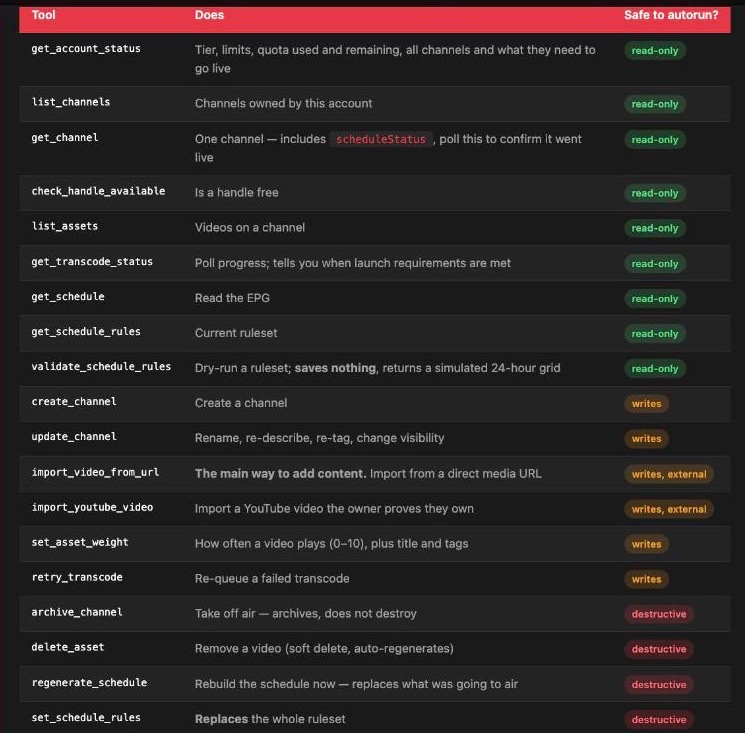
The 19 tools the server exposes. Every one ships MCP annotations (readOnlyHint, destructiveHint, idempotentHint, openWorldHint), so a client can decide for itself what it is willing to run without asking you first.
First, get an API key at my-tv-channel.com/agent-keys. It requires an active subscription on any tier, and an agent deliberately cannot mint one for itself. A human has to. The key is shown once.
Claude Code
claude mcp add --transport http my-tv-channel \
  https://my-tv-channel.com/mcp \
  --header "Authorization: Bearer mytv_sk_YOUR_KEY"
Claude Desktop, or any client using mcpServers JSON
{
  "mcpServers": {
    "my-tv-channel": {
      "type": "http",
      "url": "https://my-tv-channel.com/mcp",
      "headers": { "Authorization": "Bearer mytv_sk_YOUR_KEY" }
    }
  }
}
OpenClaw
openclaw mcp add my-tv-channel \
  --url https://my-tv-channel.com/mcp \
  --transport streamable-http \
  --header "Authorization: Bearer mytv_sk_YOUR_KEY"
That writes into ~/.openclaw/openclaw.json under mcp.servers. Check it with openclaw mcp probe my-tv-channel, and note OpenClaw's own advice: prefer an environment variable or its OAuth path to a literal bearer token in a file you might commit.
Hermes Agent
In ~/.hermes/config.yaml:
mcp_servers:
  my_tv_channel:
    url: "https://my-tv-channel.com/mcp"
    headers:
      Authorization: "Bearer mytv_sk_YOUR_KEY"
Then hermes gateway setup and hermes gateway start to keep it running and reachable from your messaging platform of choice.
One note if you are connecting many MCP servers at once: Hermes shipped tool search for MCP in May 2026, which stops a large combined tool catalogue from degrading tool-selection accuracy. With a 19-tool server plus whatever else you have connected, it earns its keep.
From nothing to broadcasting
Once connected, the whole thing is conversational. These work as written.
"What's my account status, what tier am I on and how much upload quota is left?"
Always the right first move. It reports the real limits for the account and, for every channel, exactly what that channel still needs before it can go live.
"Create a channel called Retro Arcade TV, handle retro-arcade, import these four videos, and tell me when it's broadcasting."
The agent checks the handle is free, creates the channel, imports each video by URL, polls transcoding, and reports back when the channel is on air at https://retro-arcade.my-tv-channel.com.
"Put cartoons on 6 to 9am on weekdays and news every day at 6pm."
This compiles into scheduling rules. A well-behaved agent will dry-run them first against a validation endpoint that saves nothing and returns a simulated 24-hour grid, then commit.
"Play the long-plays twice as often as the reviews."
Per-video weights, then a schedule regeneration.
A channel goes to air automatically once it has at least four ready videos and fifteen minutes of content. Transcoding is the slow step; everything else takes seconds.
If you want to see the output before spending anything, demo.my-tv-channel.com is broadcasting right now. Every part of it, the channel, the programmes, the weights and the 24/7 schedule, was created through the tools described above. Nobody opened an app to build it.
Two things that catch people
An agent cannot upload a file from your computer. MCP tool arguments are JSON; there is no multipart channel. Importing from a public URL is therefore the only ingestion path an agent has. Files on your laptop go through the apps instead.
Weights only reach the air when the schedule is generated. A channel builds its schedule the instant it crosses the launch threshold, from the weights that exist at that moment. Set them later and they are stored correctly, reported back correctly, and change nothing on air until a regeneration. Set each video's weight as you import it, or regenerate when you are done.
On any screen
This is where a channel stops being a web page. What a viewer can actually use today:
| Screen | How they watch |
|---|---|
| Any browser | Straight to https://{handle}.my-tv-channel.com, with no app and no account |
| iPhone, iPad | My TV Channel on the App Store |
| Mac | Same App Store listing |
| Apple TV | Same App Store listing |
| Android phone and tablet | Google Play |
| Android TV | Google Play |
| Roku | Add the My TV Channel app with access code MYTVCHANNEL, then find the channel inside it |
| Any WordPress site | The iReplay TV Channel & Radio plugin, embedded in a page |
Roku deserves a caveat. It has no per-channel deep link, so a viewer adds the My TV Channel app by access code and then finds your channel inside it. It is not a standalone branded Roku channel with your name on the home screen. If that is what you need, it is a separate piece of work: white-label apps, which is a service rather than a self-serve product.
The web route is the one to lead with when you share a channel. It works on every screen with a browser, needs no install and no account, and it is a plain URL you can put in a bio, a QR code or a newsletter.
If you would rather not use an agent at all
Everything above is optional. The agent is one door into the same building, and it is not the right door for everyone. If you are not already running Claude, OpenClaw or Hermes, setting one up in order to make a TV channel is a strange order of operations.
Two alternatives reach exactly the same channels, with the same playout, on the same screens.
The iOS and macOS apps
Download My TV Channel on iPhone, iPad or Mac and build the channel by hand: import from your camera roll or Files, set how often each video plays, watch it go live. On macOS you also get playout management, which the mobile apps do not have. This is the fastest route if your content is already on your device. Remember that an agent cannot upload local files, so for a library sitting on your laptop the app is not a fallback, it is the correct tool.
The WordPress plugin
If you already have a WordPress site, the iReplay TV Channel & Radio plugin puts a 24/7 channel on it without touching a terminal or an app store. Install, point it at a channel, drop the block into a page. For a club, a museum, a shop or a local newsroom that already publishes on WordPress, this is usually the shortest path from nothing to something on air.
The three routes are not exclusive. A common pattern is to build the channel in the app because that is where the footage is, embed it on WordPress because that is where the audience is, and connect an agent later once you get tired of doing the weekly schedule by hand.
What it actually costs
The agent side is free or close to it. OpenClaw and Hermes Agent are both MIT-licensed and self-hosted, so neither charges a licence fee. You pay for model tokens while the agent is thinking, and for a host if you want it always-on. A $5 VPS is enough for Hermes, and OpenClaw runs happily on a machine you already own.
The channel side starts at $0.99 a week. That entry tier includes public listing in Discover, which is worth saying because people assume it is an upsell. Higher tiers raise the upload and streaming allowances and unlock fixed-slot scheduling rules and live streaming.
The web viewer costs your audience nothing and asks nothing of them. No install, no account.
What an agent still cannot do
An honest list, because these are the ones that will otherwise waste an afternoon:
- Upload a local file. No multipart over MCP. Use a public URL, or the app.
- Create its own API key. Deliberate. A key holder cannot escalate to issuing more keys.
- Change your subscription. Billing is not on the agent surface at all.
- Give you a branded Roku channel. See the caveat above.
- Import someone else's YouTube videos. YouTube import requires the owner to publish a proof-of-ownership string in the video's description first, and only the uploader can do that. This is a copyright guard, and it is not skippable.
What is still missing
The clip layer of the MCP media stack is close to solved and will commoditise fast; there is not much differentiation left in calling FFmpeg from an agent. The problems still open all involve time: scheduling, rights windows, ad insertion, continuity, what happens at 03:00 when a source disappears.
The agent runtimes, meanwhile, are turning into small always-on operating systems for personal infrastructure. OpenClaw and Hermes both landed persistent memory and self-improving skills during 2026, which is the difference between an assistant that helps you do a thing and one that quietly keeps a thing running. A channel is a good test of that, because it is unforgiving. The failure mode is visible to your audience as dead air.
If you want to try the whole loop, watch the demo channel to see the output, then read the agent documentation for the 19 tools and their exact behaviour. If agents are not your thing, the app and the WordPress plugin get you to the same place.
Questions people ask
Do I need to keep the AI agent running for my channel to stay on air?
No. Playout is server-side and continuous. The agent is only involved when you want to change something, such as adding content, adjusting how often a video plays or moving a slot. If the agent is idle, crashed or switched off, the channel keeps broadcasting.
Can an AI agent upload a video file from my computer?
No. MCP tool arguments are JSON and there is no multipart upload channel, so an agent can only import from a public URL. For footage sitting on your laptop or your phone, use the iOS or macOS app instead.
What does it cost to run a 24/7 channel this way?
The channel starts at $0.99 a week, which includes public listing in Discover. The agent runtimes are free: OpenClaw and Hermes Agent are both MIT-licensed and self-hosted, so you only pay for model tokens and, if you want the agent always-on, a small VPS from around $5 a month.
Do viewers need to install an app to watch?
No. Every channel has a plain web address in the form https://yourhandle.my-tv-channel.com that plays in any browser with no install and no account. Apps exist for iPhone, iPad, Mac, Apple TV, Android, Android TV and Roku for viewers who prefer them, and a WordPress plugin embeds the channel on an existing site.
Can I get a branded Roku channel with my own name on it?
Not through the self-serve product. Roku has no per-channel deep link, so viewers add the My TV Channel app using the access code MYTVCHANNEL and find your channel inside it. A standalone branded Roku channel is a white-label app project, which is a separate service.