Roku is one of the biggest streaming platforms in the US, and getting a channel onto it is a realistic goal for a content owner rather than a broadcaster-scale project. There are three routes, and they differ enormously in cost. This guide covers all three, and the part that is usually hardest either way: turning a library of videos into a 24/7 channel with a stream URL that Roku can actually play.
Three ways onto Roku
Pick the route before you build anything. The work is completely different.
1. Inside the My TV Channel app (no developer account)
The cheapest route is not to publish a Roku channel at all. Build your channel on My TV Channel, and viewers watch it on Roku through the My TV Channel app. No Roku developer account, no packaging, no certification queue.
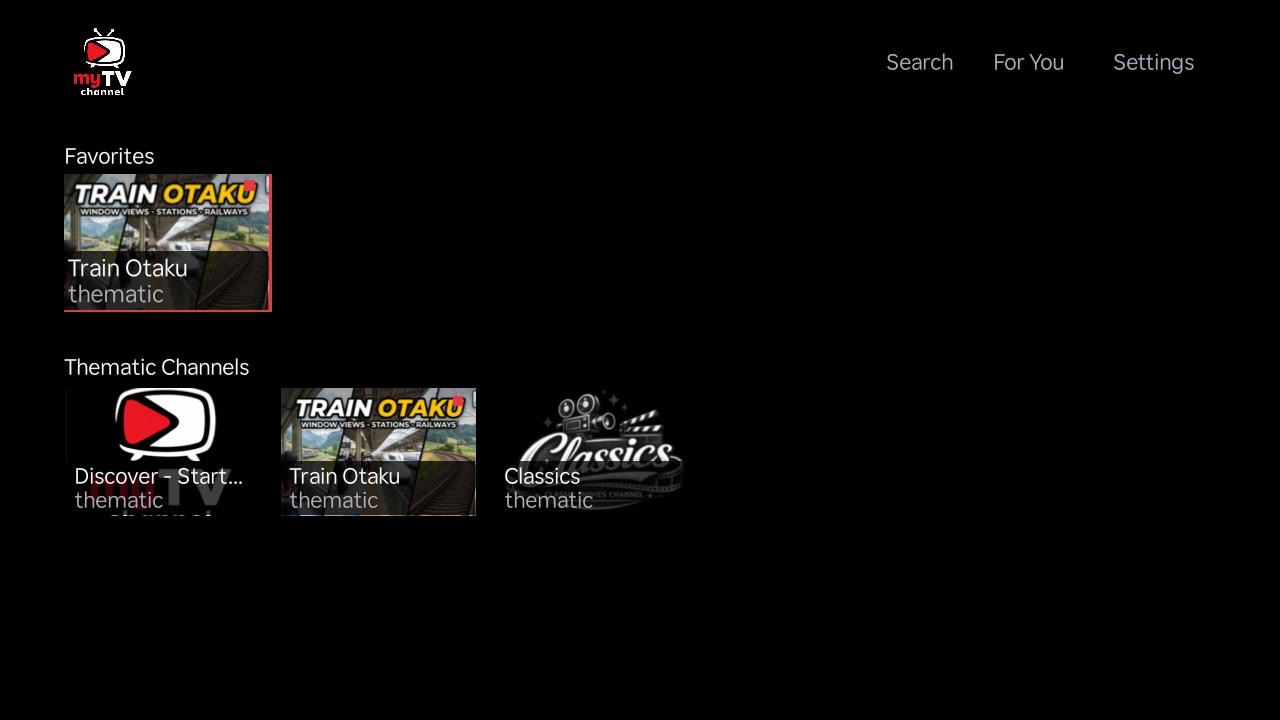
Viewers add the app on their Roku with the access code MYTVCHANNEL, at my.roku.com/add/MYTVCHANNEL, then find your channel inside it.
Be clear about the trade-off, because it is the whole difference between this route and the next two: your channel lives inside the My TV Channel app, it is not a standalone branded channel in the Roku Channel Store. Roku has no per-channel deep link, so you cannot send someone straight to your channel with a URL. If your brand needs to be the thing on the Roku home screen, you want one of the routes below.
2. Roku Direct Publisher (no code)
Direct Publisher is the accessible way to get your own channel in the Channel Store. It needs no code. You describe your catalogue in a Roku content feed, a JSON document listing your titles and pointing at the stream for each one, and Roku builds the channel interface for you.
The detail that trips people up: Direct Publisher is driven by that JSON feed, not by a stream URL on its own. An HLS .m3u8 URL is what the feed points at. You need both, and they are not the same artefact.
3. Roku SDK (custom)
The SDK route gives you a fully custom channel and an interface you control, written in BrightScript and SceneGraph. It is real development work. If you are not a developer, that means hiring one. Choose it when the interface itself is part of the product, not because it sounds more capable.
Building the channel with iReplay.tv
Routes 2 and 3 both need the same thing underneath: a continuous stream with a schedule behind it. Here is how to produce one.
Step 1: Import your content
Create an account. Sign up at iReplay.tv with Sign In with LinkedIn. It only needs the LinkedIn connection.
Import your content. Go to Source > Import Content and paste a playlist, channel or video collection URL. iReplay.tv fetches the videos and makes them available for scheduling, so you are not re-uploading a library by hand.
Step 2: Build a 24/7 schedule
A channel that plays continuously needs a schedule, which is the part people underestimate. A folder of files is a library, not a channel.
Check your sources. Your dashboard lists the source files once the import finishes.
Add videos to a channel. Select the videos you want, then press Add to TV channel... at the top of the page. Pick an existing channel, or choose Create new channel... and give it a name and the resolutions you want. Choose Standard TV Channel for the kind.
Let it schedule. With automatic scheduling there is no further step. The schedule rebuilds daily, so the channel keeps playing without you programming it by hand.
Step 3: Package it for Roku
Get the m3u8 URL. iReplay.tv generates an HLS .m3u8 URL for the channel. That URL carries the schedule and plays as a continuous linear stream.
Reference it from a Roku content feed. For Direct Publisher, point your JSON feed at that URL. This is where the two artefacts meet: the feed is your catalogue, the m3u8 is the stream.
Submit for approval. Roku reviews channels against its own guidelines before they go live. Budget time for it, and read the guidelines before you build rather than after.
If this is your first Roku channel, the iReplay.TV specialists can help with the packaging step, which is the one that most often stalls a first submission.
Monetizing a Roku channel
The channel is the easy half. Revenue is the other one. The usual models:
- Advertising. Pre-roll and mid-roll ads against your content. The common model for a free channel, and the one that scales with audience rather than with pricing.
- Subscriptions. Premium content behind a monthly or annual fee. Predictable revenue, but it needs a reason to keep paying month after month.
- Pay-per-view. A one-time charge for a specific title or event. Fits films and live events better than a rotation.
- Sponsorships. A single sponsor pays to be associated with the channel. Often the most realistic first revenue for a small audience, because it does not depend on ad-network CPMs.
FAQ
Can I get my channel on Roku without a developer account?
Yes. Build the channel on My TV Channel and viewers watch it on Roku through the My TV Channel app, added with the access code MYTVCHANNEL. There is no Roku developer account, no packaging and no certification queue. The trade-off is that your channel lives inside that app rather than being a standalone branded channel in the Roku Channel Store, and Roku has no per-channel deep link, so you cannot link a viewer straight to it.
Do I need to be a developer to publish my own Roku channel?
No, if you use Roku Direct Publisher. It builds the channel interface from a JSON content feed, with no code. You only need development skills for the Roku SDK route, which you would choose when you want a fully custom interface.
Is an m3u8 URL enough to publish on Roku?
No. An HLS .m3u8 URL is the stream. Roku Direct Publisher is driven by a JSON content feed that points at that stream. You need both: the feed describes your catalogue, the m3u8 plays the video.
What is the difference between the Roku SDK and Direct Publisher?
Direct Publisher needs no code and Roku builds the interface from your feed, which suits most content owners. The SDK gives you a fully custom channel written in BrightScript, at the cost of real development work. Pick the SDK when the interface itself is part of what you are selling.
How do I run a 24/7 channel rather than a video library?
You need a schedule and a continuous stream, not just a set of files. iReplay.tv builds the schedule from your imported content and reschedules it daily, then serves it as a single HLS stream that plays continuously.
How do Roku channels make money?
Advertising (pre-roll and mid-roll), subscriptions, pay-per-view for individual titles or events, and sponsorship. Advertising scales with audience; sponsorship is often the most realistic first revenue while an audience is still small.