YouTube is opening Stations, its 24/7 always-on channels, to creators, podcasts and media brands, four months after starting the pilot with music artists. If you publish on YouTube, this is the moment your back catalogue stops being an archive and starts being airtime.
I build the plumbing behind linear channels for a living, so my first reaction to the announcement was not excitement about a feature. It was recognition. Stations are FAST channels. The same trick that filled Pluto TV, Samsung TV Plus and most of the guide on your smart TV has arrived on the platform where creators already live. That is a bigger deal than the feature list suggests, and it is also smaller than it sounds, because of how few people are allowed to use it.
So: what a Station is, what it changes for a creator, and how to run the same thing yourself without waiting for an invitation that may never arrive.
What a Station actually is
A Station is a continuous YouTube livestream fed by a playlist of videos you have already published. Viewers see a Station badge where the Live badge normally sits, titles appear on screen as each item plays, live chat runs alongside, and there is no scrub bar. No skipping, no rewinding, no jumping ahead. You tune in and you watch what is on, exactly like a television channel.
YouTube describes it as a way to "watch collections of videos from your favorite creators as an always-on, lean-back viewing experience", where "you can watch and engage in real-time with other fans in live chat, making it feel like a shared viewing room". The pilot started in April around Coachella with roughly forty music artists. Green Day opened Green Day TV on 6 August with more than a hundred hours of archive, unreleased footage and original segments hosted by their drummer. Then, on 21 August, came the line that matters to everyone else: "While we started this pilot with a small group of music artists, you'll now start seeing Stations for a wide variety of new types of content." Creator content, media channels and podcasts, named explicitly.
None of this is new engineering. Playing existing files out as a continuous live stream is a solved problem, and it has been the backbone of free ad-supported television for years. What is new is that YouTube runs the playout for you. No encoder to configure, no stream key, no 3am failure because a machine in your office decided to sleep. Taking that operational risk away is the actual product.
Why YouTube is doing this now
The living room. In his February 2025 annual letter, Neal Mohan wrote that television had overtaken mobile as the primary device for YouTube viewing in the United States. YouTube won the biggest screen in the house, and then found out that its own interface does not work there.
Everything about YouTube is built around choosing. Thumbnails, a search box, a wall of recommendations. That is fine on a phone. On a sofa, with a remote that has a directional pad and a lot of hope, choosing is work. One of YouTube's product directors summed up the mood a viewer actually arrives with: "I want to put something on. I want it to be hands-free. I want it to stay in the same lane."
There is a commercial reason too. An always-on channel produces predictable, schedulable airtime, which is the shape that television advertising money already knows how to buy. A channel that runs all day is easier to sell than a video that might go up on Thursday.
What actually changes for a creator
A video is a decision. A channel is a habit. That distinction is the whole story.
Every upload asks a viewer to pick it over everything else on the page, and a viewer who has to pick will often pick nothing. A channel removes the question. The result shows up in time spent rather than in view count, which is why most creators have never optimised for it: on demand never gave them the option.
The second change is what happens to your library. Two hundred videos sitting at forty views a month are not failures, they are inventory. On demand they compete against your newest upload and lose. In a rotation they are programming, and somebody tuning in at four in the afternoon has no idea whether the thing playing went up last week or in 2021.
The third change is the chat, and I suspect this is the part people will underestimate. A Station carries live chat around the clock. It is open at four in the morning, because the channel is. Chat on a livestream ends when you end the stream; chat on a channel that never stops becomes a place people come back to. Anyone who runs a Discord already knows how much more a place is worth than a view.
The honest counterpoint: a Station is not a reach machine. It surfaces mostly to people who already follow you, so it is a depth and retention play rather than a discovery one. If you are hoping it brings you new subscribers on its own, temper that.
What Stations do not give you yet
There is no application. Access is invite-only, YouTube has published no eligibility criteria, and the nearest thing to a sign-up is a feedback form. The feature is live in nearly every YouTube region apart from Portugal, Switzerland and Türkiye, and even there it is limited to what YouTube calls a small number of new creators for this experiment. If you are reading this hoping to start one today, you probably cannot.
There is no schedule either. A Station is a loop, not a playout. You cannot say the long documentary airs at nine and the short block runs at lunchtime. No dayparting, no bumpers between items, no crossfade, no overlay, no way to cut out of the loop into a live segment and back in. Audio-first shows sit awkwardly because the format wants a video track, which is odd given that podcasts were named in the announcement.
Nothing has been published about how a Station monetises. Whether the ads behave like normal ads, whether a sponsor read inside your own programming is allowed, whether Premium watch time counts the same way: none of it is documented. My guess is that it lands on ordinary Partner Program rules, but a guess is what it is.
The last gap is the one I keep coming back to. A Station lives inside the YouTube app. You cannot embed it on your own site, you cannot put it on Roku or Fire TV under your own name, you cannot hand a sponsor a channel page you control, and you cannot take it with you if the experiment ends. YouTube is lending you the format. It is not giving you a channel.
Creators are quietly turning into broadcasters
Stations are one instance of something wider. Rumble built a linear lineup of its own. Sofa is putting sixteen linear channels onto YouTube across Brazil, Latin America, the United States and Portugal. Every company sitting on a large library is arriving at a conclusion broadcasters reached decades ago: a schedule is a product, and it is a different product from a catalogue.
So the question is not whether you should run an always-on channel. It is whether you rent one or own one.
You can run your own 24/7 channel today, and nobody has to pick you
This is the part that does not require an invitation. My TV Channel is open to everyone. There is no waitlist, no experiment, no small group of selected creators, no form you fill in and then hear nothing. You sign up and you are broadcasting the same day.
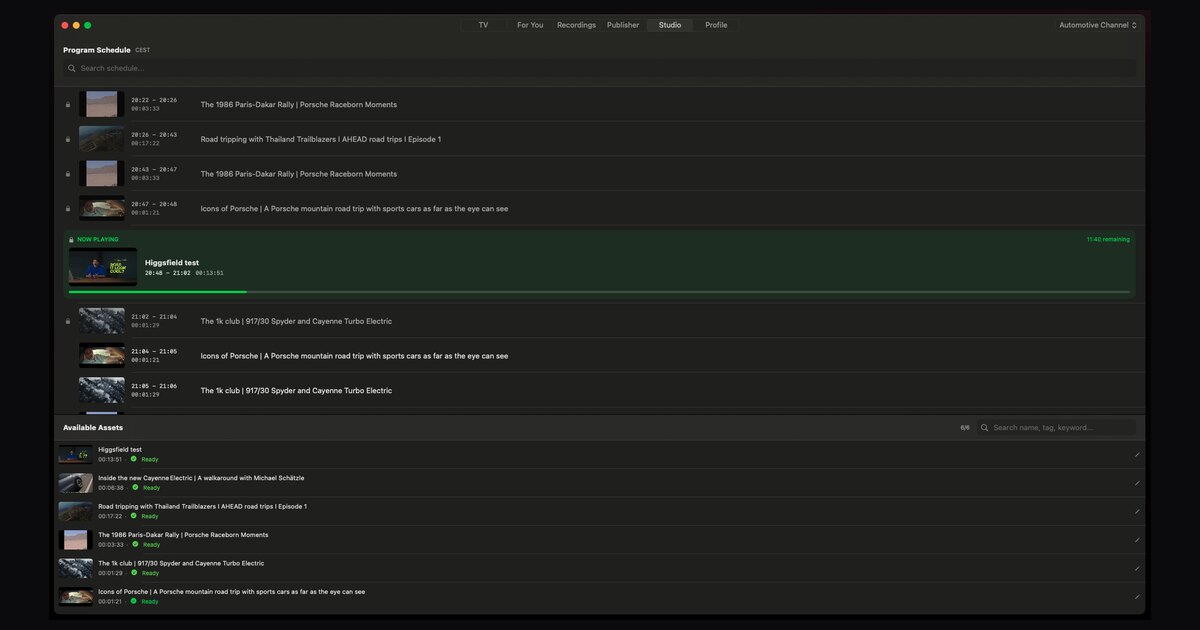
It takes a library of videos and turns it into a real linear channel: you upload, it transcodes, it builds a rolling 24/7 schedule, and it plays out continuously. The screenshot at the top of this article is that schedule. Program grid, now playing, up next, a clock counting down the current item. It is what a playout system in a broadcast centre does, without the broadcast centre.
Four things it gives you that a Station does not.
Anyone can start one. Stations are limited to creators YouTube has chosen. My TV Channel has no gate at all. That difference matters more than any feature comparison, because a channel you cannot get access to is worth nothing to you today.
It goes where your audience is, under your name. Channels publish to iPhone, iPad, Apple TV, Mac, Android and Android TV, Roku and Fire TV, plus a web player you can embed on your own site. Your channel gets its own handle and its own page, so a sponsor has somewhere to look that belongs to you rather than to a platform.
The watch-along happens in your Discord. You link your existing Discord server to the channel and viewers get a chat overlay on top of the player, on the web and in the apps. The community room you already run becomes the room people watch in. Because the channel never stops, that room never closes, and the conversation about what is airing happens where your community already talks instead of in a chat box you do not control.
The money is yours to make. Advertising on My TV Channel carries 0% commission: the platform takes nothing and the ad revenue goes to the publisher. Free channels carry an "Advertise on this channel" button right on the player, so a brand that finds your channel can reach the advertiser portal and book directly, with no middleman setting your rate. If you would rather charge viewers, pay-per-view connects your own Stripe, PayPal, Revolut, Patreon, Gumroad or Ko-fi account and you keep 100% of what you sell. Ad breaks use server-guided insertion with HLS interstitials, so a break is a real break inside the stream rather than an overlay a browser extension can remove.
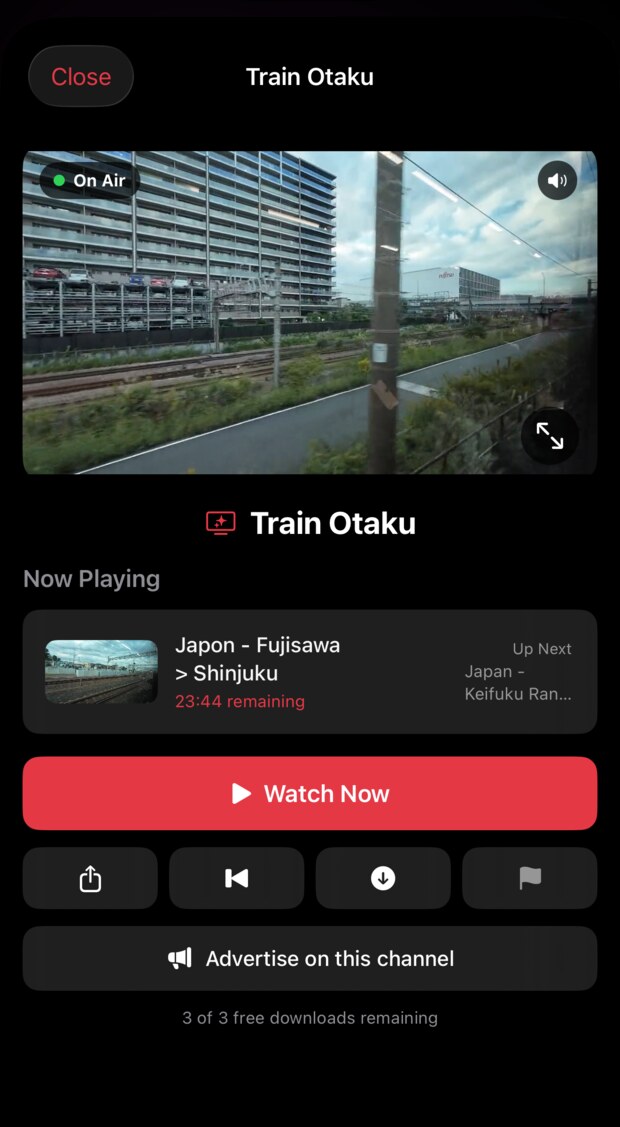
It runs on iPhone, iPad, Apple TV, Mac, Android and Fire TV, and the Starter plan is $0.99 a week with the first week free. That is close enough to nothing, which is about the right price for finding out whether your audience will leave your channel on.
How to get ready, whether or not YouTube picks you
- Count your hours. A day holds twenty-four of them. Below roughly eight hours of content a viewer hits a repeat inside one sitting and the illusion breaks. Add up your runtime before anything else.
- Find the strands, not the playlist. Pick three or four recurring shapes in what you already publish and treat them as shows. A channel that alternates between strands feels programmed. A channel that shuffles everything feels like a screensaver.
- Make idents and filler. Twenty seconds of channel identity between items is what separates a channel from a queue. It is the cheapest production you will ever do and it changes the feel more than anything else on this list.
- Open the room. Point the chat at the Discord you already have rather than starting a new one, and put the channel link where your community already talks.
- Price the break before anyone asks. One sponsor slot an hour is twenty-four slots a day. Decide what that is worth now, so that when a brand asks you have a number instead of a pause.
Whatever happens with your invitation, the format is not the scarce part. The programming is. Build the channel while you wait, and if YouTube does open the door, you will walk through it with something already on air.
Questions
What is a YouTube Station?
A Station is a 24/7 livestream on YouTube built from videos a channel has already published. It runs continuously, shows a Station badge instead of a Live badge, carries live chat, and cannot be paused, skipped or rewound by the viewer.
Who can create a YouTube Station right now?
Only a small group of invited creators. YouTube began with around forty music artists in April 2026 and expanded on 21 August 2026 to selected creators, media channels and podcasts. There is no application process and no published eligibility criteria, only a feedback form.
Do YouTube Stations make money for creators?
YouTube has not published monetisation terms specific to Stations. Ordinary Partner Program rules are the reasonable assumption, but how ads and sponsorships behave inside a Station has not been documented.
Can I run a 24/7 channel without waiting for a YouTube invitation?
Yes, and you do not need to be selected. My TV Channel is open to anyone. It builds a continuous linear channel from your video library and publishes it to Apple TV, Roku, Fire TV, mobile and an embeddable web player, with Discord chat and advertising or pay-per-view that you control.
Is a Station the same thing as a FAST channel?
Technically, yes. Both play existing files out as a continuous live stream, a technique the industry calls VOD2Live. The difference is distribution and control. A FAST channel sits in a smart TV guide or on a site you own, while a Station sits inside YouTube.
Does a Station replace my normal uploads?
No. A Station is fed by videos you have already published, so it sits on top of your regular publishing rather than replacing it. Think of the uploads as the catalogue and the Station as the schedule built from it.
Related reading: vertical TV, and how to launch a 9:16 channel of your own.